
Call us: +919217844785
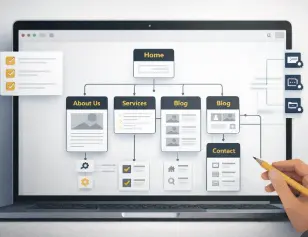

One of the most common questions small business owners ask before building a website is:
“What pages should a small business website have?”
And it’s a valid question.
Too many businesses either:
- Launch a website with too few pages and look unprofessional, or
- Add too many unnecessary pages that confuse visitors and kill conversions.
Here’s the hard truth:
Your website doesn’t need more pages. It needs the right pages.
In this guide, we’ll break down what pages a small business website should have, why each page matters, and how these pages work together to build trust and generate leads.
Table of Contents
Why Website Pages Matter More Than Design
Before listing pages, understand this:
People don’t visit your website to admire design.
They visit to:
- Understand what you do
- Decide if they trust you
- Figure out what to do next
If your pages don’t answer those questions clearly, no design will save you.
That’s why knowing what pages should a small business website have is critical.
1. Home Page (Non-Negotiable)
Your homepage is not an introduction—it’s a decision page.
Visitors should understand within 5 seconds:
- Who you help
- What you offer
- Why they should care
What a good homepage includes:
- Clear headline (what you do + who it’s for)
- Brief problem and solution
- Key services overview
- Trust elements (testimonials, logos, experience)
- Strong call-to-action
If your homepage is vague, every other page suffers.
2. About Us Page (Trust Builder)
Many business owners underestimate this page. That’s a mistake.
The About page answers one question:
“Can I trust this business?”
A strong About page includes:
- Who you are
- Who you serve
- Your experience or journey
- Your values or approach
- Why are you different
Avoid writing your life story. Focus on credibility and relevance.
If you’re asking what pages should a small business website have, the About page is mandatory.
3. Services Page (Conversion Driver)
This is where leads are made or lost.
Your services page should clearly explain:
- What you offer
- Who it’s for
- What problems does it solve
- What results clients can expect
Best practice:
- One main services overview page
- Separate pages for each core service (if applicable)
Clear services pages reduce confusion and attract better leads.
4. Individual Service Pages (If You Offer More Than One Service)
If you offer multiple services, each deserves its own page.
Why?
- Better SEO
- Clear messaging
- Higher conversion rates
Each service page should include:
- Problem description
- Your solution
- Benefits
- Process overview
- CTA
This is especially important for agencies and consultants.
5. Contact Page (Lead Capture Page)
Surprisingly, many websites get this wrong.
Your contact page should make it easy, not complicated.
Must-haves:
- Simple contact form
- Phone number or WhatsApp option
- Business email
- Location or service area
- Clear next steps
If people want to contact you and can’t, they won’t try again.
6. Testimonials / Reviews Page (Social Proof)
Trust is everything for small businesses.
A testimonials page:
- Reduces hesitation
- Builds confidence
- Supports every service you offer
What works best:
- Real client names
- Specific feedback
- Results-focused testimonials
- Screenshots (if possible)
This page answers the silent doubt:
“Has this business helped people like me?”
7. Blog or Resources Page (Long-Term Growth)
If you care about SEO, authority, or organic traffic, you need a blog.
A blog helps you:
- Answer customer questions
- Rank on Google
- Build expertise
- Support service pages
You don’t need to blog daily. Consistency matters more than volume.
For many businesses, the blog becomes the biggest traffic source.
8. FAQ Page (Objection Killer)
An FAQ page saves time and improves conversions.
It addresses:
- Pricing doubts
- Process questions
- Trust concerns
- Common objections
This page is especially useful for:
- Service-based businesses
- High-consideration offers
Well-written FAQs reduce unnecessary calls and improve lead quality.
9. Privacy Policy & Legal Pages (Mandatory)
These pages don’t convert—but they protect you.
At a minimum, your website should have:
- Privacy Policy
- Terms & Conditions (if applicable)
- Cookie Policy (if you use tracking)
They are essential for:
- Legal compliance
- Ads approval
- Trust signals
Optional Pages (Depending on Business Type)
Not every business needs these, but many benefit from them:
Case Studies / Portfolio
Great for:
- Agencies
- Designers
- Consultants
- Service providers
Pricing Page
Good for:
- Filtering serious leads
- Reducing back-and-forth
Landing Pages
Used for:
- Campaigns
- Ads
- Specific offers
Common Mistakes Small Businesses Make
If you’re still unsure what pages should a small business website have, avoid these mistakes:
- Copying competitors blindly
- Adding pages “just in case”
- Writing generic content
- No clear CTAs
- Ignoring mobile users
A smaller, focused website always performs better than a large, unfocused one.
How Many Pages Does a Small Business Website Need?
There’s no magic number, but a solid starting structure is:
- Home
- About
- Services (plus individual service pages if needed)
- Contact
- Testimonials
- Blog
- Legal pages
That’s enough to look professional, rank on Google, and generate leads.
Final Thoughts
If you’re building or redesigning a website and wondering what pages should a small business website have, remember this:
Your website should:
- Educate
- Build trust
- Guide action
Every page must serve a purpose.
If it doesn’t help users decide, it doesn’t belong.
Need Help Structuring Your Website Pages?
At Backend Spark, we help small businesses:
- Plan the right website structure
- Create high-converting pages
- Design WordPress websites that grow with the business
- Avoid unnecessary pages and confusion
Get a free website planning consultation, and we’ll help you decide exactly what pages your small business website should have.
I hope you enjoy this post, and if you want to receive future updates, please follow Backend Spark on Facebook and Instagram.